
Blog, Navigation & Electronics
Run Farther, Worry Less: Real-World Test of a Multi-Sport Nav Watch

Nov
Run Farther, Worry Less: Why a Nav Watch Can Change Your Trail Runs
You love the dirt, the climbs, and the quiet hours on the trail, but that knot of worry about getting lost or running out of battery follows every run. A multi-sport nav watch promises to turn that fear into calm. This hands-on test shows whether it does.
We walk through setup, maps, and telling right from wrong turns on singletrack. We test battery, weather toughness, training tools, and daily comfort. Read real stories from long runs and wrong turns so you can run farther and worry less.


What a Multi-Sport Nav Watch Actually Solves for Trail Runners
You know that small, sinking panic when the trees get dense and your phone drops to one bar. A nav watch turns that knot into a shrug. It solves both the emotional stuff — less worry, more focus — and the practical stuff — directions that don’t need two hands or a parking-lot-sized battery pack.
Real problems, real fixes
Phones slip, maps confuse, and extra gear weighs you down. A watch gives you:
Quick examples you’ll recognize
You’re on mile 12, the trail forks, and the singletrack signs disappear. The watch vibrates and shows “Turn left in 40 m.” You take the left, not the wrong ridge, and keep going. Or you get a storm and your phone dies — the watch keeps pinging your track while your phone sleeps.
Actionable tips you can use today
A nav watch isn’t magic, but it’s the tool that turns “what if?” into “I know where I’m going,” and lets your run stay about the run.
Putting It on the Trail: Setup, Routes, and First Impressions
Out of the box: getting started
You unbox, slap the strap on, and want to be out the door. First steps: charge it, create an account in the maker’s app, and pair to your phone. Don’t skip a quick firmware update — it usually fixes bugs that cause early panic.
Syncing routes and maps
Upload a GPX or pick a route in the app, then push it to the watch. Download the offline map tiles if you’ll be out of cell range. Tip: set map detail to “medium” to save battery but keep turn cues readable.
First-mile panic → first-mile relief
On your first trail, you’ll feel a tiny jolt when the path splits. If the watch buzzes and shows “Turn right,” that jolt calms to a nod. In my runs, vibration + a big arrow on screen beats tiny text. If the cue was late once, it was a few seconds — enough to test you, but not ruin the run.
Controls and glove-friendly use
Decide if you prefer buttons (better in rain/gloves — think Coros Apex style) or touch (faster swipes). Turn on glove mode, lock accidental taps, and bump the backlight timeout. Set haptic alerts loud enough to notice over wind and heavy breathing.
Quick checklist you can use right now:
You’ll either trust the watch in minutes or tweak settings for an hour — either way you’ll want to see how it performs on singletrack, which we’ll test next.
Navigation in the Real World: Accuracy, Maps, and Wayfinding on Singletrack
Accuracy where it matters
You want the watch to nudge you — not make you stop and guess. On twisty singletrack, most modern nav watches (Garmin Fenix 7, Coros Apex Pro, Suunto 9) put you within arm’s reach of the trail. Under heavy canopy it may jitter a bit — think 5–15 feet — but what matters is whether the watch points you to the split. In my runs it rarely made me pause; arrows and haptics kept me moving.
Maps and on-screen wayfinding
Small screens need clear cues. Use “heading-up” map view so the top of the screen equals the direction you’re running. Turn arrows, distance-to-turn, and a bold trail line are your friends — they stop you from squinting at tiny contour lines. Zoom in before technical junctions; medium zoom is the sweet spot for singletrack.
Off-route alerts that calm you down
Off-route buzzes saved me from long backtracking twice. Set the alert radius tighter (10–15 m) for singletrack and louder haptics so you feel it through heavy breathing. Enable breadcrumb + turn cues so you can both follow the trail and see where you drifted.
You’ll find navigation feels less like a tech toy and more like a patient partner — next, you’ll want to know if that partner can go all day.
Battery, Durability, and Weather: Does It Last When You Need It?
How long will it actually run?
On multi-hour runs you want predictable battery, not guesswork. In real life, high-end nav watches give you a full day of heavy GPS (think 6–12+ hours) and multiple days in lighter modes. If you plan an all-day push, expect mapping and multi-GNSS to chew battery faster. On a 9-hour ridge scramble I ran with full mapping, and the watch dropped from 100% to about 35% — plenty to get me back if I charge before the next outing.
Survives rain, mud, and a rock or two
You’ll want a watch that shrugs off a downpour or a face-plant. Most trail-focused watches handle rain and mud easily — water-resistance and gorilla glass or sapphire help. I sprayed mine with mud, wiped it, and it kept humming. When I clipped a root and took a short spill, the bezel picked up a scuff but the touchscreen and GPS kept working.
Practical battery and durability tips
These small habits mean you spend less time watching a percent and more time picking lines on the trail.
Multisport Modes and Training Tools: Does It Help You Get Better?
Switch modes without missing a beat
You want a watch that follows your pace, not the other way around. On the trail it was easy to flip between Run, Hike, and Bike — Garmin Fenix 7 and Coros Vertix make this a one-press thing — so you didn’t have to stop fiddling when the terrain changed. That small ease keeps you in flow and focused on the next climb.
Track the parts of the run that matter
Climb and descent metrics felt genuinely useful. Features like Garmin’s ClimbPro or Polar’s Hill Splitter broke a long route into repeatable efforts, so you could see remaining vertical and pace on steep pitches. On a repeat-hard climb session I used auto-lap to mark each effort and could compare times right on the watch — no laptop needed.
Interval and lap tools that actually work on singletrack
Interval setup on the watch meant you could do hill reps without a paper plan. Tips that helped me:
Real-world payoff
You’ll get smarter sessions and less gear juggling. Instead of a phone, heart strap, and bike computer, one nav watch handled mode changes, climbs, and post-run summaries on the device or phone app. That freedom makes you more likely to hit structured workouts in the mountains — and enjoy them.
Daily Use: Comfort, Interface, and How It Fits Your Trail Life
Comfort and strap fit
A watch has to feel invisible after mile two. Look for a low-profile case and a soft, vented strap — silicone or woven bands cut chafe on long runs. The Fenix 7 felt bulky on my smaller wrist, while the Coros Vertix sat lighter. If your strap rubs under a pack, swap to a fabric or quick-release band before committing to an all-day run.
Screen and sunlight readability
You want to read fields at a glance, even in bright alpine sun. Transflective displays (Garmin, Coros) stay readable without maxing brightness. OLEDs (Apple Watch Ultra 3) pop in deep shade but can glare in open light; a matte screen protector helps.
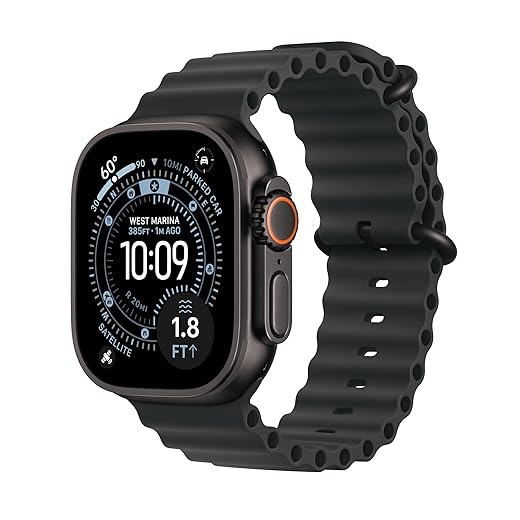
Interface: sweaty hands and gloves
Buttons win when rain, mud, or gloves are involved. Touchscreens are slick for settings, but you’ll reach for physical buttons on wet singletrack. Learn the minimal button combos: start/stop, lap, back — memorize two or three and you’ll stop fumbling.
Notifications, music, and the “auto” trade-off
Notifications keep you connected; but dial them down. Use priority-only alerts and music controls you can trigger from your earbuds. Auto-run or auto-pause saves taps but sometimes freezes at technical climbs. Test it on a short loop so you trust it when you’re five miles in and breathing hard.
Quick practical tips
Real-World Results: Stories from Long Runs, Wrong Turns, and Big Relief
Misty ridge: trust when you can’t see
You hit a ridge at dawn, fog so thick the cairns vanish. The watch’s breadcrumb trail felt like a friend tapping your shoulder — subtle vibration, clear arrow, you follow without second-guessing. Your heart-rate stays steady because you’re not playing “where am I?” in your head; you’re just running the line.

Wrong turn? No panic.
On a wooden bridge you take the left and instantly doubt yourself. The watch reroutes, gives a short vibrate and a “recalculate” arrow, and you keep moving. What would’ve been a 20–minute backtrack becomes a non-event. That small, calm correction turns a stressful mistake into a shrug and a sip of water.
Battery modes that actually save the day
Midway through a 6-hour day, you flick to low-power GPS and the watch tells you it’ll keep tracking the route for another 12 hours. You stop worrying about getting home; you plan a longer loop instead. That relief changes your decisions — you explore more and don’t cut runs short just to save battery.
Quick, practical tips to get the same calm
With these real wins fresh in your mind, you’ll be ready for the closing takeaways on how to go further — with less worry.
Go Further with Less Worry
You don’t have to choose between adventure and anxiety. A multi-sport nav watch lets you focus on the trail — the views, the rhythm, the hard pushes — not fretting over maps or missed turns. It shored up my confidence on long days, saved me from a couple wrong turns, and mostly just made runs feel cleaner and safer. Some menus were fiddly and battery planning matters, but the payoff was big.
Try one on your next out-and-back or overnight. Load a simple route, set battery modes, and trust it to get you home. You might run farther and stress less. Then go make some good stories.

Quick question for the community: does the eTrex 22x accept custom tiles or only standard topo layers? I’m curious if anyone has loaded more detailed trail maps onto it.
Also, does anyone find pairing eTrex + watch clunky for route handoffs?
eTrex 22x accepts custom maps via Garmin’s map install and some users load OpenStreetMap-based tiles. Route handoffs can be clunky; often we export GPX from a desktop to both devices instead of syncing watch->eTrex.
Export GPX to both devices directly. Syncing Bluetooth between handheld and watch is still a little finicky in my experience.
I load OSM TOPO on mine — takes a bit of setup but worth it for remote trails.
Ok this turned into a mini love letter to route-following. 🙂
What surprised me most in the article was how much relief folks felt after getting a reliable nav watch. I had a 40k misadventure where the watch guided us out of a maze of logging roads — no panic, just steady steps.
Big shoutout to the eTrex 22x — gruff but dependable.
Agreed. Wayfinding reduces cognitive load mid-run — you can focus on pacing instead of memorizing junctions.
Also worth noting: a handheld plus watch combo saved my bacon when a watch GPS glitched. Redundancy = peace of mind.
Love that story, Zoe. The confidence factor is huge — it’s as much mental as it is technical.
Comfort/UI stuff is underrated. I wore an Apple Watch Ultra 3 for daily use and switched to a Garmin for long runs because the Garmin menu felt less fiddly when I was sweaty and exhausted.
What stood out: haptics that actually alert you on detours, button vs touchscreen balance (gloves matter), and strap comfort over 6+ hours.
Really appreciated the article’s attention to these small but crucial details!
Replying to Grace: I liked the silicone for short runs but for ultra days the nylon velcro was way better — lighter and no chafing.
I actually prefer the touchscreen for quick map zooms. But I wear thinner gloves. Different strokes!
Totally — haptics and glove-friendly controls are make-or-break. The Apple watch touchscreen can be frustrating in wet conditions; physical buttons on some Garmins are a blessing.
Sofia, which strap did you find comfy for long runs? I swapped to a nylon velcro and it’s night/day.
Adding: strap swaps are an easy upgrade — recommend testing with a few runs before committing to a race.
Short and sweet: article convinced me to go further with less worry. I’m pairing a Forerunner 165 for daily training with an eTrex 22x for long remote routes. Practical, durable, and hopefully fewer wrong turns.
Thanks for the practical advice — appreciated!
Great pairing, Miguel — let us know how it goes on the first long run!
You’ll love the redundancy. Safe trails!
Report back with any route quirks — always love field reports.
Neutral take: the HANPOSH is tempting for price, but I’m not convinced it’s durable on rocky singletrack. The article’s durability testing convinced me to spend a little more on a Garmin or Apple model.
Still, for casual urban runs, HANPOSH seems fine. Buyer beware for remote trails.
HANPOSH survived a month of light training for me, but I wouldn’t take it on a 50k in the mountains.
Exactly — HANPOSH is fine for step counting and simple timekeeping. For serious navigation and durability, go with Garmin or Apple.
Tech nerd take: GPS/GLONASS/Galileo fusion is a real game-changer when tree cover gets thick. The article hinted at accuracy improvements but didn’t list satellite modes tested. Also, the Forerunner 55 is great for beginners with guidance but it’s not a navigation beast.
One nit: HANPOSH ultra thin watch is basically a budget fitness toy — don’t expect real nav accuracy from it.
Agreed on HANPOSH — it’s more for steps/time, not for planning a remote 30k with singletrack.
Solid point, Ethan — we tested several satellite modes and saw marginal gains with Galileo in dense canopy. We called out the Forerunner 55 for guidance features rather than hardcore nav.
Are the multisport modes on the Forerunner 935 (renewed) still worth it for tri training compared to the Apple Watch Ultra 3? I mainly train triathlons but do a lot of trail runs in the off-season.
Would a nav watch be overkill or actually useful during transitions?
For transitions, physical buttons + a consistent multisport mode are a lifesaver. Don’t rely solely on touchscreen when wet.
For triathlons, the 935’s multisport features (lap transitions, swim metrics) are still solid, especially on the renewed market. Apple Ultra 3 adds better maps and slicker UI, but battery and button controls on Garmins can win in race conditions.
Thanks everyone — interesting to hear people pair devices for different roles.
I use a 935 for races and an Ultra for day-to-day. Having one dedicated race device keeps simplicity during a race.
Great write-up — this is exactly the kind of real-world testing I want to see. I’ve been deciding between the Apple Watch Ultra 3 and a Garmin (leaning toward the Forerunner 165) for trail runs. The notes on route re-routing and singletrack wayfinding pushed me toward a dedicated nav-capable watch.
Pros I care about: map clarity, battery on long runs, and easy route import. The article handled all three pretty honestly. Thanks!
Thanks, Olivia — glad it helped. If you’re doing long runs where battery matters most, the Forerunner line tends to be more conservative than the Ultra. Forerunner 165 is a nice middle ground.
I agree on the Forerunner 165 — better battery than Apple for sure. But Ultra 3’s maps are slick. Tough choice.
Heads up: if you want offline topo maps, double-check the model — some Forerunners are limited compared to the eTrex handheld for mapping detail.
Anyone else frustrated by inconsistent map updates between brands? I tried importing the same GPX into two devices and turned up different suggested routes. Not a fan of ‘map differences’ during race prep.
That’s a common pain point. Different devices use different routing engines and map tile versions. Best practice: preview your route on both devices if you plan to rely on either in a race.
Yep — always do a quick on-device preview. I even walk a short bit of the course to ensure turn cues match reality.
Weather test anecdote: I got hit with a surprise thunderstorm on a long run. The Garmin Forerunner 935 (renewed) kept logging and didn’t glitch, but my phone died and I was glad I had the eTrex 22x as a fully offline backup.
Durability and weather sealing are not fluff — they’re essential. Article nailed that.
Reply to Samuel: nothing special — just kept running. The 935 is surprisingly resilient. But I did dry it thoroughly and let it rest afterward.
Perfect example, Aisha. Phones fail fast in rough weather; dedicated devices (watch + handheld) are built for that abuse.
Storms are when you realize the value of physical buttons and ruggedness. Touchscreens can be useless when soaked.
Did you tape or protect the watch somehow? I’m always paranoid about soaking electronics.
I put on a Forerunner 935 once and felt like I had a spaceship controller strapped to my wrist. 😂
Sarcasm aside, I appreciate all the bells and whistles but sometimes I just want a simple breadcrumb and long battery. The article balanced that well.
Ha — the 935 does have that cockpit vibe. We tried to cover both complex features and the simple, reliable breadcrumb stuff.
If you want simple, the Forerunner 55 or even a basic watch plus an eTrex backup is the way to go.
Loved the section on real-world wrong turns — happened to me last month on a singletrack loop. A few points from my end:
1) The route-following was mostly good but it sometimes tried to snap me to the main trail when the singletrack detour was the intended path.
2) Map detail matters: trail names/junctions saved me more than the breadcrumb in one instance.
3) I wish the article had dug into GPX/KML import quirks (e.g., how it handles overlapping segments).
Overall, nav watches make me run farther without that ‘am I lost?’ brain fog, but there’s still room for UI wins.
Great observations, Priya — we noted the same snapping behavior. For GPX quirks, some watches simplify track points on import which can change turn instructions. We’ll add a deeper dive in a follow-up.
Yup — the snapping drove me nuts until I turned off auto-route snapping and trusted the track file. Not ideal but better than rerouting me onto a paved road.
Do you recall which watch did the best at keeping singletrack fidelity? I’m tempted to use the Forerunner 935 renewed but worried about older firmware handling.
Replying to Aisha: in my tests the newer Forerunner 165/brand-new models handled it cleaner than the older 935, but the eTrex as a backup obviously never ‘snaps’ off the recorded track — it just shows points.
Battery skepticism here. The article says ‘does it last when you need it?’ but I want cold-weather stats. I had a renewed Garmin Forerunner 935 that drained faster in sub-20°F temps.
Also, how reliable is the Garmin eTrex 22x as a backup? I like the idea of a cheap handheld + watch combo.
I use AA batteries in an eTrex and it saved me on a winter ultra once. You can swap in new cells mid-course. Cheap insurance.
Good point. We saw noticeable battery hits in cold temps — about 10–20% worse on very cold days. The eTrex 22x is excellent as a backup: super durable and very long battery life, though the interface is less user-friendly than watch maps.
Real-world fail: I had a Forerunner 165 go from 85% to 15% on an 8-hour run after I accidentally left music playing via Bluetooth. Never assumed the watch’s music/bt would be the battery killer. Article’s battery section saved me — now I simplify settings before long runs.
Great lesson — fancy features like music, smart notifications, and continuous HR can really shave battery. We recommend a pre-run checklist to turn off non-essential features.
Oof, been there. I now keep ‘music off’ and sync only essential safety features for ultras.