Small gadget, huge peace of mind for off-grid adventures.
You know that sinking feeling when you crest a ridge, pull out your phone — and it says “No Service”? Suddenly the trail flips from fun to worrying. Not exactly the time to start practicing smoke signals.
Enter the Garmin inReach Mini 2. It’s tiny and feather-light so it won’t drag down your pack, but it lets you send messages and call for help by satellite when your phone can’t. Yes, it needs a subscription, but for the calm and safety it buys you on sketchy routes, that’s a small price to pay.
Editor's Choice
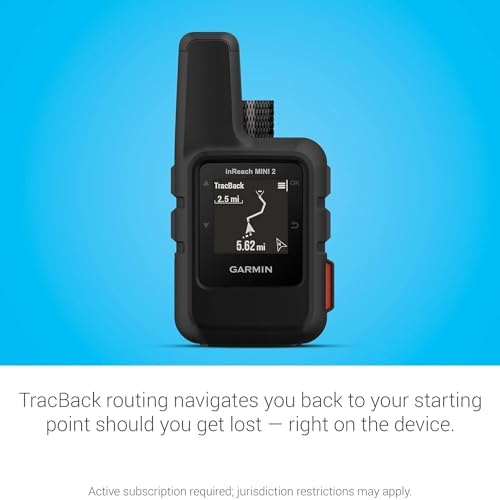
Garmin inReach Mini 2 Satellite Communicator — Compact Black Hiking Handheld
Perfect for remote hikers and lightpackers
8.7/10
EXPERT SCORE
This device gives you real peace of mind on routes where cell service can’t reach. It’s tiny, tough, and built to keep you connected and get help if you need it, without weighing you down.
Ultra-light and pocketable — barely adds weight to your pack
Two-way satellite messaging plus interactive SOS for real safety
Excellent battery life for multi-day trips in tracking mode
Simple button interface and rugged build suited to outdoors
Works with Garmin Explore app for route planning and syncing
Cons
Requires paid satellite subscription to use messages and SOS
Small screen and few on-device map features compared to larger GPS units
Introduction
You carry comfort and safety when you bring this compact satellite communicator on a trip. If your idea of a great day is a ridge line, alpine lake, or a trail that drops off the grid, this device keeps a simple lifeline between you and home. It’s built to be light, easy to use, and dependable when the mobile towers stop answering.
What you’ll find in the design
Compact footprint: about the size of your palm and weighing under 100 grams, it slips into pockets, packs, or attaches to a shoulder strap without fuss.
Rugged casing: tough plastics and a weather-resistant body that handles rain, mud, and bumps on the trail.
Button-driven controls: physical buttons you can operate with gloves or while wet — no fiddly touchscreen in bad weather.
Communication and emergency features
Two-way satellite messaging: send and receive short texts to friends, family, or emergency services when you’re outside cell range.
Interactive SOS: trigger an SOS that lets a professional monitoring center communicate back with you, track your location, and coordinate a rescue.
Location sharing: send coordinates or a MapShare link so loved ones can follow your progress or know exactly where you are.
Pairing with phone and other Garmin gear: use your phone for typing longer messages and to get map overlays while keeping the satellite link active.
Navigation and mapping tools
TracBack routing: follow your steps back the way you came, great for when landmarks look different in low light or low visibility.
Digital compass: gives you a reliable heading even if you’re standing still or holding the unit awkwardly.
Garmin Explore sync: plan routes, create waypoints, and push trips from the web or phone to your device so you don’t have to punch in coordinates on the trail.
Key specs at a glance
Feature
What it gives you
Weight
~99 g — barely noticeable in your pack
Battery life
Up to 14 days in 10-minute tracking mode; varies by use
Screen
1.27-inch monochrome sunlight-readable display
Connectivity
L-band satellite network (Iridium) via subscription; Bluetooth to phone
Durability
Weather-resistant design for outdoor use
Real-world battery and power tips
Typical runtime: If you run a 10-minute track interval for a multi-day trip, expect around two weeks of life; heavy messaging or frequent SOS use will drop that time.
Power-saving moves: lower tracking frequency, switch off Bluetooth when not pairing, and carry a small USB power bank for extended trips.
Overnight and cold-weather care: batteries can lose efficiency in cold; keep the unit inside an insulated pocket overnight to preserve power.
How you’ll use it on adventures
Solo day hikes: a pocket-sized safety net for weekend trails where cell service is spotty.
Multi-day backpacks: track your location for friends and family and use waypoint syncing for campsite navigation.
Remote trips: pair with a phone to type longer messages, or use the device alone to send brief texts and trigger SOS when needed.
Why it works for lightpackers
Minimal weight, maximum reassurance: you gain a lot of safety without the bulk of larger satellite units.
Simple to learn: you’ll be up and running quickly, even if you don’t like manuals — the button layout and app pairing are straightforward.
Flexible: you can use it alone or pair it with a phone for more advanced map work and message composition.
Trade-offs to expect
Not a full mapping handheld: if you want large on-device topo maps and a big color screen, this isn’t the unit for that — it focuses on messaging and safety.
Subscription required: to use the satellite features and SOS, you’ll need a paid plan. That ongoing cost is the price of global connectivity.
Practical tips to get the most out of it
Test before you go: trigger a test message and make sure your MapShare link and emergency contacts are set up at home.
Practice using the SOS: know how the interactive SOS flow works so you don’t fumble in a real emergency.
Place it on the outside of your pack or on a chest strap for the best satellite view — trees and metal roofs can block the signal.
Final thoughts
If your goal is to get farther from cell towers but come home with stories (not surprises), this device is one of the best ways to carry reassurance without pain in your pack. It’s built to do a few critical jobs really well: keep you in touch, help rescuers find you, and give you simple navigation when you need it. Just remember the subscription and tiny screen; if those fit your trip style, you’ll find it hard to leave it behind.
Garmin inReach Mini 2 Satellite Communicator — Compact Black Hiking Handheld
Do I need a subscription to use the inReach Mini 2?
Yes. You must have an active satellite subscription to send two-way messages and to use SOS.
When you pick a plan, think about how often you’ll be out of cell range. Plans come as month-to-month, annual, or seasonal options. Prices and message/track allowances vary by plan.
Pick a short-term plan if you only go out a few times a year.
Choose a regular or higher-tier plan if you adventure often or need frequent tracking.
You can usually change, pause, or cancel your plan online. Always activate service before heading out.
Will it work everywhere on Earth?
Yes — it uses the Iridium satellite network, which provides global coverage, including high latitudes.
Signal needs a clear view of the sky. Trees, cliffs, deep canyons, buildings, or being inside a vehicle or backpack can block the connection.
Move to an open area and hold the unit up for a better fix.
Give it a minute or two to lock to satellites.
If you’re under heavy canopy or between steep walls, you may need to relocate for a reliable link.
Can I send long messages from the device?
On-device typing is limited and works best for short texts and presets.
Pair the unit with your phone and use the Garmin Explore app to type longer messages with a full keyboard. The app also makes it easier to manage contacts and send emails or phone-number texts through the satellite link.
Use presets for quick check-ins when you don’t want to type.
Expect some delay — messages go over satellites and can take longer than cell texts.
You can embed location coordinates in messages to show where you are.
How does the SOS feature actually work?
When you trigger SOS, an alert is sent to a professional 24/7 monitoring center (GEOS). They open two-way text contact with you to confirm the emergency and your exact location.
The monitor then notifies and coordinates with local emergency services. They can request search and rescue, medical evacuation, or other help on your behalf.
GEOS keeps trying to reach you and updates responders until help arrives.
You can cancel an accidental SOS if you regain safety.
Be prepared to share details like injuries, number of people, and your location when contacted.
How do I keep the battery from dying on long trips?
Plan for long battery life before you leave. Full charge gives up to two weeks at a 10-minute tracking rate, but you can extend that.
Use longer tracking intervals (30 or 60 minutes) to save power.
Turn off Bluetooth and other features when not needed.
Lower backlight time and avoid unnecessary pings.
Carry a small power bank or portable solar charger.
In cold weather, keep the unit against your body overnight to preserve battery output.
Is it easy to use with gloves or in bad weather?
Yes. The unit has physical buttons and a sunlight-readable screen, so you don’t need to rely on a touchscreen.
It’s built for outdoor use and stands up to rain and snow. You can press the buttons with most gloves on, and the screen stays readable in bright sun.
Use the included carabiner or a lanyard to keep it handy in bad weather.
If conditions are very wet or icy, shield the unit while you press buttons to keep contacts dry.
Can I pair it with my watch or other Garmin devices?
Yes. You can pair it with compatible Garmin wearables and handhelds via Bluetooth and the Garmin Explore app.
Pairing lets you send and receive messages from your watch or another device and, in many setups, trigger SOS from that device.
Set up pairing before your trip so it works offline.
Note that watch screens show limited text, so full conversations are easier on your phone or handheld.
Are there legal limits to using satellite communicators?
Yes. Rules vary by country, region, and specific areas like parks or military zones. Some places restrict or regulate satellite communications.
Check local laws, park rules, and entry requirements before you travel.
Some countries require permits or registration for radio/satellite gear.
Rescues can sometimes incur charges; check your travel insurance and local policies.
When in doubt, ask the park office, embassy, or local authority so you don’t run into surprises.
This post contains affiliate links. Purchases may earn me a commission at no extra cost to you.
James Fannin
25 thoughts on “Garmin inReach Mini 2: Pocket-Sized Lifesaver When Your Phone Fails”
Priya Kapoor says:
I like the idea but I’m a bit cautious — price point is okay, but warranty is only one year and I’d expect better long-term support given it’s a safety device. Would like to see a longer warranty or stronger repair policy from Garmin.
Constructive criticism: maybe include a short checklist in the article for first-time users (test message, firmware, subscription setup, emergency contact list). That would be really practical.
Fair critique, Priya. I agree a checklist is a great addition — I’ll add one to the article (test message, firmware update, subscription activation, contact setup, power-plan). Regarding warranty, I’ll include the one-year limit clearly in the buyer notes.
Marcus Lee says:
+1 on the checklist idea. Also consider noting what to pack for battery backup—makes the review more actionable.
Josh Bennett says:
Bought this after reading — tiny but fierce. Couple quick notes:
– Setup was 10 mins
– Sent my first message from the backyard and felt like a secret spy 🕵️♂️
– Minor gripe: menu buttons are small and I fumble with gloves 🤦
Worth it for peace of mind imo.
Laura Jensen says:
A tip: put a small grippy tape or a rubberized sleeve on it for better handling with gloves.
Glad it worked out for you, Josh. Good point about gloves — button interfaces can be tricky. Might be worth sizing up the manual controls during cold-weather trips.
Tanya Ortiz says:
Secret spy vibes are the best part. 😄
Laura Jensen says:
Thanks for the thorough review — this is exactly the deep-dive I needed.
I do a lot of solo overnight hikes and the idea of a tiny device that can summon help (and send messages) is super reassuring. A few extra thoughts from my experience:
– The battery life claim matches what I saw on a long weekend: it really can last for days if you manage the ping rate.
– Bluetooth pairing with my phone was a little finicky the first time, but the app updates helped.
– Would love clarification on whether the Mini 2 supports continuous tracking on very long multi-day trips without a separate power bank.
Overall: great blend of size and safety, and that 99 g weight is a game changer for lightweight packers.
Evan Michaels says:
Agree with Laura — I used one for a 4-day route and set tracking to 10-minute intervals overnight and 2-minute during the day. Ended with ~40% battery. A 10k mAh bank is very light and gives plenty of extra time.
Thanks for sharing your experience, Laura — glad the review helped. For continuous tracking, the Mini 2 can handle long trips but tracking frequency matters: the more frequent the pings, the quicker the battery drains. Many hikers carry a small power bank for multi-day treks to keep it topped up.
Priya Kapoor says:
Good tip about the power bank. Also remember cold temps kill battery fast; I pack mine in an inner pocket at night.
Tanya Ortiz says:
So I bought one because my phone turns into a brick as soon as I lose a cell tower. Little thing is adorable and bossy — kind of like a tiny, quiet bodyguard that nags about firmware updates. 😂
Seriously, though: if you’re someone who frolics off-trail or goes into areas with bad reception, this is the sort of thing you want. It won’t replace good planning, but it’ll save your bacon if things go sideways.
Also: I clipped it to my pack strap with the included carabiner and forgot it was there until someone pointed it out. Lightweight win!
Tanya Ortiz says:
No beeps or sirens — it sends a signal to GEOS/rescue services via satellite. So silent but effective.
Marcus Lee says:
How loud is the SOS signaling to rescuers? I always wonder if the device itself makes noise or it’s all via satellite to responders.
Josh Bennett says:
LOL ‘adorable and bossy’ — perfect description. I had the same surprise when the firmware prompt popped up mid-hike.
Thanks for the colorful review, Tanya. Firmware updates can usually be done before you head out to avoid interruptions. Good reminder to check that before trips.
Evan Michaels says:
Quick tech question: does the Mini 2 rely solely on the Iridium network, or does it fallback to other satellites? I’m considering it for some remote alpine routes and want to understand coverage nuances.
Also, is there any way to integrate waypoint uploads from third-party mapping apps into the device/app workflow, or is it mostly Garmin-centric?
Priya Kapoor says:
Hold it higher if possible — on top of your pack or a pole. Canyons can block the signal, so getting the unit above your head helps a lot.
The inReach Mini 2 uses the Iridium satellite network for two-way messaging and SOS — that gives near-global coverage. For waypoint/import workflows, the device pairs with Garmin’s Explore app, and you can import GPX files into the app to sync. Third-party integration varies, but exporting GPX from most mapping services and importing into Garmin Explore usually works.
Evan Michaels says:
Great, thanks. That solves my main concern. Any tips on antenna orientation for best connect in narrow canyons?
Laura Jensen says:
I export GPX from Gaia GPS and import into Garmin Explore without issues. Takes an extra step but it’s reliable.
Josh Bennett says:
Also try to step to a clearing for a minute. Even small changes in position can find a satellite.
Marcus Lee says:
Solid write-up. Two things I wish the review mentioned more clearly:
1) Subscription costs — the device is great but the ongoing fees can add up (I think you touched on it briefly).
2) How intuitive the app is for first-time users. I got confused at first and almost didn’t send a test message correctly.
Typo on page 3? ‘tracback’ spelled without capital? small thing but noticed. 🙂
Good points, Marcus. We did list subscription as a necessary consideration, but I’ll add a clearer breakdown of plans and typical annual costs in an update. The app is functional but not super intuitive at first — a quick test message before heading out is a smart move.
Tanya Ortiz says:
Subscription surprised me too. People assume ‘buy once’, but satellite services = ongoing fees. Worth it for safety, though.






I like the idea but I’m a bit cautious — price point is okay, but warranty is only one year and I’d expect better long-term support given it’s a safety device. Would like to see a longer warranty or stronger repair policy from Garmin.
Constructive criticism: maybe include a short checklist in the article for first-time users (test message, firmware, subscription setup, emergency contact list). That would be really practical.
Fair critique, Priya. I agree a checklist is a great addition — I’ll add one to the article (test message, firmware update, subscription activation, contact setup, power-plan). Regarding warranty, I’ll include the one-year limit clearly in the buyer notes.
+1 on the checklist idea. Also consider noting what to pack for battery backup—makes the review more actionable.
Bought this after reading — tiny but fierce. Couple quick notes:
– Setup was 10 mins
– Sent my first message from the backyard and felt like a secret spy 🕵️♂️
– Minor gripe: menu buttons are small and I fumble with gloves 🤦
Worth it for peace of mind imo.
A tip: put a small grippy tape or a rubberized sleeve on it for better handling with gloves.
Glad it worked out for you, Josh. Good point about gloves — button interfaces can be tricky. Might be worth sizing up the manual controls during cold-weather trips.
Secret spy vibes are the best part. 😄
Thanks for the thorough review — this is exactly the deep-dive I needed.
I do a lot of solo overnight hikes and the idea of a tiny device that can summon help (and send messages) is super reassuring. A few extra thoughts from my experience:
– The battery life claim matches what I saw on a long weekend: it really can last for days if you manage the ping rate.
– Bluetooth pairing with my phone was a little finicky the first time, but the app updates helped.
– Would love clarification on whether the Mini 2 supports continuous tracking on very long multi-day trips without a separate power bank.
Overall: great blend of size and safety, and that 99 g weight is a game changer for lightweight packers.
Agree with Laura — I used one for a 4-day route and set tracking to 10-minute intervals overnight and 2-minute during the day. Ended with ~40% battery. A 10k mAh bank is very light and gives plenty of extra time.
Thanks for sharing your experience, Laura — glad the review helped. For continuous tracking, the Mini 2 can handle long trips but tracking frequency matters: the more frequent the pings, the quicker the battery drains. Many hikers carry a small power bank for multi-day treks to keep it topped up.
Good tip about the power bank. Also remember cold temps kill battery fast; I pack mine in an inner pocket at night.
So I bought one because my phone turns into a brick as soon as I lose a cell tower. Little thing is adorable and bossy — kind of like a tiny, quiet bodyguard that nags about firmware updates. 😂
Seriously, though: if you’re someone who frolics off-trail or goes into areas with bad reception, this is the sort of thing you want. It won’t replace good planning, but it’ll save your bacon if things go sideways.
Also: I clipped it to my pack strap with the included carabiner and forgot it was there until someone pointed it out. Lightweight win!
No beeps or sirens — it sends a signal to GEOS/rescue services via satellite. So silent but effective.
How loud is the SOS signaling to rescuers? I always wonder if the device itself makes noise or it’s all via satellite to responders.
LOL ‘adorable and bossy’ — perfect description. I had the same surprise when the firmware prompt popped up mid-hike.
Thanks for the colorful review, Tanya. Firmware updates can usually be done before you head out to avoid interruptions. Good reminder to check that before trips.
Quick tech question: does the Mini 2 rely solely on the Iridium network, or does it fallback to other satellites? I’m considering it for some remote alpine routes and want to understand coverage nuances.
Also, is there any way to integrate waypoint uploads from third-party mapping apps into the device/app workflow, or is it mostly Garmin-centric?
Hold it higher if possible — on top of your pack or a pole. Canyons can block the signal, so getting the unit above your head helps a lot.
The inReach Mini 2 uses the Iridium satellite network for two-way messaging and SOS — that gives near-global coverage. For waypoint/import workflows, the device pairs with Garmin’s Explore app, and you can import GPX files into the app to sync. Third-party integration varies, but exporting GPX from most mapping services and importing into Garmin Explore usually works.
Great, thanks. That solves my main concern. Any tips on antenna orientation for best connect in narrow canyons?
I export GPX from Gaia GPS and import into Garmin Explore without issues. Takes an extra step but it’s reliable.
Also try to step to a clearing for a minute. Even small changes in position can find a satellite.
Solid write-up. Two things I wish the review mentioned more clearly:
1) Subscription costs — the device is great but the ongoing fees can add up (I think you touched on it briefly).
2) How intuitive the app is for first-time users. I got confused at first and almost didn’t send a test message correctly.
Typo on page 3? ‘tracback’ spelled without capital? small thing but noticed. 🙂
Good points, Marcus. We did list subscription as a necessary consideration, but I’ll add a clearer breakdown of plans and typical annual costs in an update. The app is functional but not super intuitive at first — a quick test message before heading out is a smart move.
Subscription surprised me too. People assume ‘buy once’, but satellite services = ongoing fees. Worth it for safety, though.