

Blog, Camp Kitchen, Navigation & Electronics, Other Camping Gear, Sleeping Bags & Bedding, Tents and Shelters, Uncategorized
Wahoo Bolt vs Edge 530: Never Miss a Turn on Your Ride

May
Tired of getting lost and wasting rides—find out which bike computer actually keeps you on track and makes every ride feel like a win.
You’re tired of squinting at tiny maps and missing turns on big rides. This quick guide compares the Wahoo Bolt and Garmin Edge 530 so you can ride confident, stop worrying, and enjoy every mile without losing speed or focus.
Sleek Simplicity

You get a no-fuss, sporty computer that keeps your head up and your focus on riding. It’s built to be simple and fast, so you waste less time fiddling and more time enjoying the road.
Feature Packed

You’ll appreciate the extra smarts when you want to train harder or explore new routes — it keeps up with ambitious rides. It’s your tool for digging into performance data and never getting lost on long adventures.
Wahoo Bolt GPS
Garmin Edge 530
Wahoo Bolt GPS
Garmin Edge 530
Wahoo Bolt GPS
Garmin Edge 530
Stay on Course: Navigation & Mapping Showdown
You hate getting lost mid-ride. Here’s how the Bolt’s simple cues stack up against the Edge 530’s full maps so you can trust the route and keep pedaling.
Turn-by-turn & quick cues
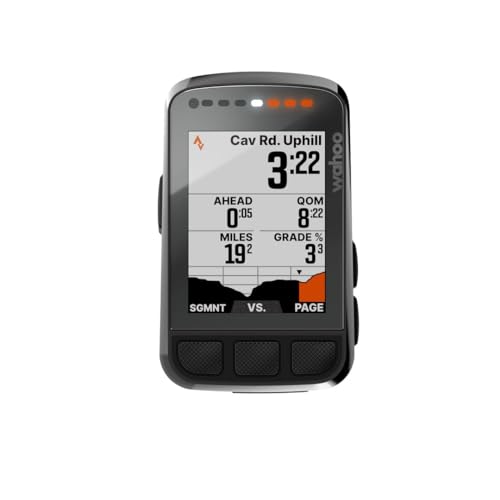
The Bolt gives blunt, no-drama turn cues: big arrows, Quicklook LEDs, and clear text so you don’t hunt for info. You see a cue, you react—no panic.

The Edge 530 shows more on-screen detail and recalculates aggressively if you miss a turn. That extra info helps you recover fast when you wander off-route.
Map size & clarity
Bolt’s 2.2″ screen is crisp and easy to read at a glance. It’s perfect when you want minimal distraction and fast decisions. The smaller map means less fiddling.
The Edge’s larger color map gives more street detail, elevation and context so you can pick better lines through confusing intersections.


Rerouting, offline maps & popularity routing
Both store maps on-device and reroute. The difference: Garmin’s popularity routing finds the roads other riders use—great when you want safe, familiar lines. Bolt keeps things simple and reliable if you prefer no-nonsense directions.
What helps you trust the route:
Feature Comparison Chart
Set Up Fast, Ride Faster: Ease of Use & Ride Focus
You want tech that stays out of your way. Here’s how these two get you out the door and keep distractions low.
Plug-and-play setup & sensor pairing
Wahoo is famously plug-and-play. The Bolt’s app walks you through sensors, data pages and Quicklook LED setup in plain language—one tap and your power, HR and cadence show. It feels like getting a bike tuned by a friend, not a manual.


Garmin can do everything Wahoo does, but it asks more questions up front. Pairing is rock-solid and supports radar, lights and weird accessories, but you may spend extra minutes in menus the first time.
Screen, controls and on-ride focus
Bolt’s big arrows, ambient light sensing and button controls keep your eyes on the road. No accidental taps, no menu labyrinths—just glance, react, ride.
The Edge 530 gives a larger map and more on-screen detail. It’s button-driven too, and that’s great in rain or with gloves, but the menu depth can pull your attention if you’re customizing mid-ride.
Custom pages & app sync
Wahoo: fast drag-and-drop pages in the app, syncs automatically, minimal fuss.Garmin: deeper fields and Connect IQ apps for nerds who love data—more power, more setup time.
What matters when you’re rushing out the door:


Performance, Battery & Value — What Keeps You Riding
Long rides test gear. Here’s the real-world breakdown so you know which unit keeps you calm on climbs, which one rescues you when the battery dips, and which gives the best bang for your buck.
GPS accuracy & live tracking
Both give solid GPS and pair to your phone for live tracking. Garmin’s bigger screen shows more map detail so you stop guessing where to turn. Wahoo keeps things clear and simple — easy to read at speed.
Battery life & charging
Garmin wins on raw endurance. You’ll get up to 20 hours, and add a power pack for much more. Wahoo’s Bolt is 15 hours but USB-C topping mid-ride is a life-saver if you carry a small battery.
Safety & training features
Garmin packs in safety tools (bike alarm, group messaging, radar support) and deep training metrics (VO2 max, recovery, MTB stats). Wahoo focuses on clean ride data, quick cues, and reliable sensor pairing — great if you want distraction-free rides.
Price & value
Garmin gives more features and longer battery life at a lower price. Wahoo costs more but gives a lighter, simpler experience and fast on-ride charging. Pick Garmin if you want battery, data, and safety. Pick Wahoo if you want simplicity, crisp turn cues, and a sleek on‑bike presence.
Final Verdict: Pick the One That Keeps You Riding
Overall winner: the Garmin Edge 530 — it’s the pick if you want deep maps, powerful training metrics, and worry-free navigation so you never miss a turn.
If you crave plug‑and‑play simplicity, aero focus, and a tidy setup that gets you back on the road fast, grab the Wahoo Bolt and ride happy. Which one fixes your biggest ride worry? Decide now.

Minor nitpick: Garmin’s firmware updates can be annoying sometimes (reboots, weird bugs right after an update). Has anyone else experienced that? Wahoo seems calmer on patches.
Otherwise, Garmin’s training features are fantastic — I just dread the occasional update day 😂
Firmware changes can be jarring. We always recommend backing up settings where possible and reading patch notes before updating on the eve of a big ride.
YES. Had an update that changed my screen layout and I had to reconfigure mid-season. Pain in the butt.
Okay, long-ish post because I tested both for a month and here’s my breakdown:
1) Bolt is delightfully simple. Turn-by-turn works perfectly for city rides. Battery lasts me about 10-12 hours with basic sensors.
2) Edge 530 is a beast for performance geeks — vo2, anaerobic, heat-adjusted stuff — you name it.
3) Mapping: Garmin’s maps are more detailed and the reroute logic in heavy traffic/mountain sections felt smarter.
4) App ecosystem: Garmin Connect + Strava integration is fuller, but Wahoo’s app is cleaner and faster.
TL;DR: If you want fewer menus and faster setup -> Bolt. If you’re into training metrics and mapping depth -> Edge 530. Both are solid, but different vibes.
Great comparison, Priya — would you say the Edge 530 is noticeably heavier or bulkier on the stem mount compared to the Bolt?
Not much heavier but the Edge 530 feels chunkier. I prefer the Bolt’s aero mount personally.
Thanks for the detailed list — really helped me decide. How’s the touchscreen vs buttons? I’m clumsy with touch screens in rain.
Both have buttons — Bolt isn’t touchscreen (ELEMNT Bolt is button-driven). If you ride in wet conditions, buttons are a win.
Edge 530 uses buttons, which is great in the rain/gloves. Bolt has physical buttons too I think? Might be misremembering.
I’m torn — the Edge 530 maps look amazing but the Bolt’s simplicity is tempting. Also price is a factor; Bolt often goes on sale.
Anyone compared battery life under similar tracking settings? I do long gravel rides and battery anxiety is real 😅
I run both with ANT+ sensors sometimes — Edge lasts longer if you crank map detail. On basic nav Bolt and Edge felt similar for me, around 8-12 hrs.
If you’re doing long gravel, also check screen visibility in dust/mud — Bolt’s screen is easy to wipe quickly.
Thanks y’all! Power bank idea noted. Might go Bolt and carry juice for ultra days.
I got a solar-adapter for my rides lol jk — but seriously, power bank does the trick.
Battery depends a lot on settings (GPS mode, backlight, sensors). Generally, the Edge 530 has longer battery potential in endurance modes, but Bolt is excellent with power-saving too.
If you want long battery + mapping, some people carry a small power bank and use a USB power-out mount. Not ideal but works for 10+ hour rides.
I love how the Bolt’s interface shows only what I need. No distracting widgets. I’m not a data head, just want a clear map and speed. Bought it after getting fed up with menu bloat on another unit.
That’s a common reason riders choose Bolt. Any features you miss from your old unit?
One thing that didn’t get much attention in the article: mount compatibility and aftermarket mounts. If you like using different handlebar setups, the Bolt’s quarter-turn mount is more universal in my kit. Garmin’s out-front mount is solid but I had to buy adapters for my aero bars.
Good point — mounts are an underrated practical difference. Did you have to use a specific adapter for your aero bars?
Yep I had the same issue. Ended up getting a cheap aluminum adapter and it’s been fine.
I keep reading about “popularity routing” for the Edge — can someone explain how that actually works? Is it just follow the crowds or does it consider safety/road type? Curious before I spend the $$.
Thanks all — that helps a lot. Might try Edge 530 on sale and test popularity routing on a short ride first.
It can be a great way to discover good roads though — I’ve found hidden gems this way.
Popularity routing uses aggregated ride data (from Garmin users) to suggest roads popular with cyclists. It prioritizes frequently ridden routes but doesn’t explicitly rate safety. It’s useful to find commonly used bike-friendly roads, but always review the suggested route for shoulder width and traffic.
Yeah, popular routes are usually bike-friendly but sometimes they include gravel lanes or busy urban connectors. Use your judgement.
Quick question: do either devices have good alerting for turns when you’re in a group? I don’t want to miss a cue and get left behind.
I pair mine to a bone-conduction headset — both units come through fine, but Garmin shows more next-turn distance info.
Both have clear turn prompts; Garmin offers more on-screen detail for complex junctions, and Bolt’s cues are concise. For group rides, track the volume of audio prompts and consider a handlebar speaker or pairing with your phone for louder cues.
Edge 530 owner here — huge fan of the popularity routing. I discover so many decent backroads I never would have tried otherwise. Garmin’s data-heavy approach can feel nerdy but it’s brilliant if you want to analyze every climb. Also, the crash detection once saved me from a nasty tumble alerting my wife. Worth the extra learning curve.
I’ve owned the Bolt for two seasons and honestly it’s been great for quick rides. Setup was painless with the app, and I love the clean screen — no clutter. If you just want ‘plug-and-ride’ navigation, Bolt nails it.
That said, if you do a lot of mountain rides and want deep metrics, Garmin might be better. But for road riding and weekend group rides, Bolt’s simplicity wins for me.
Agreed — Bolt’s UI is so straightforward. I synced mine with a cadence sensor and it was effortless. No training rabbit hole either 😂
Thanks for sharing your experience, Emily — that’s exactly the kind of real-world view some readers need. Do you use the cadence/speed sensors with it too?
Nice! I’m leaning Bolt for my commuter bike because I don’t want to fiddle with menus mid-ride.
Tested both in heavy tree cover. Bolt lost signal more quickly, in my experience. Garmin’s mapping+recalculation kept me on course in a forest descent when I hit a fallen tree detour. Might be firmware luck though.
Also try switching GPS mode (GPS+GLONASS/Galileo) — it can help in heavy canopy.
Interesting — I thought Wahoo’s GPS locking was comparable. Maybe antenna placement differs across units.
Good field report. Terrain, firmware, and location of the unit on the stem/bar can all affect GPS performance. Worth testing in similar conditions before committing.